Cybersecurity

Managed threat detection · Inline threat prevention · 24/7 alerts

Inline Threat Management & 24/7 Security Alerting

We inspect traffic, email and devices in real time, block malicious activity at your firewall, endpoints and inbox, and monitor and alert around the clock, so threats are stopped early and you always know what happened.

Get a Free Security Assessment Call 631-982-4632

What is inline threat management?

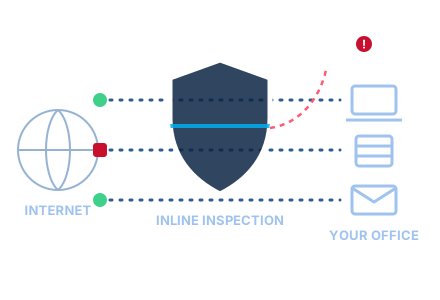
Inline threat management puts protection directly in the path of your business traffic: between the internet and your network, on every computer and server, and in front of your email. Because it sits inline, it can inspect activity as it happens and stop malicious connections, links, files and programs before they reach your people or data.

Blocking is only part of it. Every event is logged, real threats become clear alerts, and our team monitors those alerts 24/7. When something needs more than an automatic block, we investigate and respond. That combination of inline threat prevention and managed threat detection and response is what keeps a small problem from becoming a business-stopping incident.

At a glance

  • Real-time inspection and blocking at the network edge, endpoints and email
  • 24/7 security monitoring and alerts
  • Clear, prioritized alerts with the action already taken
  • Containment and response when a human is needed
  • Regular reporting in plain language
  • Backed by our digital forensics team

How it works: detect, block, alert, respond

  1. 1

    Detect

    Traffic, devices, email and sign-ins are inspected continuously. Known threats are matched instantly and suspicious behavior is flagged even when it doesn't match a known pattern.

  2. 2

    Block

    Because the protection sits inline, in the path of the traffic, malicious connections, links, files and processes can be stopped before they reach your people or systems.

  3. 3

    Alert

    Real events become clear, prioritized alerts with what happened, where, how serious it is and what was already done. Noise and duplicates are filtered out, around the clock.

  4. 4

    Respond

    We contain what needs containing, such as isolating a device or locking an account, then fix the cause, restore what's affected and tell you in plain language what happened.

Then we review what happened, tune the rules and close the gaps, so the same threat is less likely to get through again.

What we monitor and protect

One set of eyes across the places attacks usually start.

Network edge & firewall

Inbound and outbound traffic, intrusion attempts, port scans and connections to known-malicious destinations.

Computers & servers

Malicious files, ransomware-like behavior, suspicious processes and tampering with security tools.

Email

Phishing, malicious links and attachments, look-alike domains and spoofed senders.

Accounts & sign-ins

Sign-ins from new locations or devices, repeated failed attempts, unexpected multi-factor prompts and risky mailbox rule changes.

Web browsing

Visits to malicious or newly created sites, blocked before the page loads.

Remote access

Connections into your network from staff working remotely and attempts against internet-facing services.

What our alerts look like

Each alert tells you what happened, how serious it is, what was already done and what happens next. The cards below are examples only, with sample data, to show the format.

Example alertSample data
High

Phishing link blocked

Time
Tue 9:42 AM
Source
Email & web protection
User
a.user@yourcompany.example
Status
Blocked

What happened: A link in an invoice-themed email led to a look-alike sign-in page built to capture passwords.

Action taken: Link blocked when clicked. The same message was removed from two other mailboxes.

Next step: User notified and reminded how to report suspicious email. Sender domain added to the block list.

Example alertSample data
Critical

Ransomware behavior quarantined

Time
Sat 2:17 AM
Source
Endpoint protection
Device
OFFICE-PC-14
Status
Contained

What happened: An unknown program began rapidly renaming and encrypting files in a shared folder.

Action taken: Program stopped and quarantined. Device isolated from the network automatically.

Next step: On-call team reviewed the device, restored the affected files from backup and traced how the program arrived.

Example alertSample data
Medium

Suspicious login from a new country

Time
Sun 11:05 PM
Source
Account sign-in monitoring
User
b.user@yourcompany.example
Status
Awaiting user confirmation

What happened: Correct password entered from a country this user has never signed in from (sample address 203.0.113.24). Multi-factor prompt was denied.

Action taken: Sign-in blocked, active sessions ended and a password reset required.

Next step: We are contacting the user to confirm it wasn't them before the account is fully restored.

Example alertSample data
High

Firewall intrusion attempt blocked

Time
Wed 3:51 AM
Source
Network firewall (intrusion prevention)
Target
Remote access portal
Status
Blocked

What happened: Repeated exploit attempts against an internet-facing service from sample address 198.51.100.77.

Action taken: Malicious traffic dropped inline. Source address blocked at the firewall.

Next step: Confirmed the targeted service is fully updated. Event included in your next security report.

Example alerts for illustration. Names, devices, times and addresses are sample data, not real client events.

Why businesses choose managed inline threat protection

Threats stopped earlier

Inline protection blocks many attacks before they reach a person, a device or your data.

Watched around the clock

24/7 monitoring and alerting, nights, weekends and holidays included, without building your own security team.

Alerts that mean something

We filter out noise so the alerts that reach you are real, prioritized and explained.

Plain-language answers

Every significant alert comes with what happened, what we did and whether you need to do anything.

Investigators behind the alerts

If something needs a deeper look, our digital forensics team can find out exactly what happened.

One team for IT and security

The people who manage your IT also manage your security, so fixes happen fast and nothing falls between vendors.

What you get

  • Review of your current firewall, endpoint and email protection
  • Inline protection set up and tuned for how your business works
  • 24/7 monitoring, alerting and response
  • An agreed escalation plan: who we contact, how and when
  • Regular reports on what was blocked and what needs attention
  • Recommendations to close gaps, and help putting them in place

Find out what is getting through today

Start with a free security assessment. We review your current protection and show you where inline blocking and 24/7 alerting would make the biggest difference.

Get a Free Security Assessment

Call 631-982-4632

Inline threat management FAQ

What is inline threat management?

It is security that sits directly in the path of your network traffic, email and devices, so it can inspect activity as it happens and block what is malicious, not just record it. We pair that real-time blocking with 24/7 monitoring and alerting, and a team that responds when something needs a human.

How is inline protection different from monitoring alone?

Monitoring-only tools watch a copy of your traffic and tell you about a problem after it has started. Inline protection is part of the path the traffic takes, so it can drop a malicious connection, block a phishing link or stop a harmful program before it does damage. Most businesses benefit from both: inline blocking for known and suspicious threats, and monitoring for anything that needs investigation.

Is this the same as managed detection and response (MDR)?

It overlaps. Managed detection and response focuses on watching your systems, investigating alerts and responding to threats. Our inline threat management includes that detection and response and adds prevention at the network edge, on endpoints and in email, so many threats are blocked before an alert is even needed.

How is this different from antivirus?

Traditional antivirus looks for known bad files on a single computer. Inline threat management covers your firewall, email, computers and accounts together, looks at behavior as well as known threats, and has people reviewing alerts and responding 24/7.

What happens when an alert fires in the middle of the night?

Many threats are blocked automatically, and the alert records what was stopped. For serious events, such as ransomware-like behavior or a likely account takeover, we act to contain the threat, for example by isolating a device or locking an account, and contact you according to the escalation plan we agree on together.

How will we be notified?

We agree up front who should be contacted, how (phone, email or text) and for which kinds of events. Routine blocked threats are summarized in regular reports; urgent issues are escalated right away.

Will inline inspection slow down our network?

Inline inspection adds a step to how traffic is handled, so we size and configure it for your connection and the way your team works. We tune it during setup and after, so protection stays strong without getting in the way of everyday work.

Do we need our own IT or security staff?

No. We can manage everything for you. If you have an in-house IT person, we can work alongside them and share alerts and reports with them.

Can you work with the security tools we already have?

Often, yes. We start by reviewing your current firewall, endpoint and email protection, then recommend what to keep, what to adjust and what is missing.

What does it cost?

It depends on the number of users, devices and locations and what you want covered. After a free assessment we give you a clear monthly price with no surprises.

Case studies · Identifying details changed for confidentiality

See how we respond when something gets through

Read how we investigated remote-access fraud and documented it for an insurance claim, and how we checked multiple devices and a network for suspected malware.

Remote-access fraud response →   Multi-device malware exam →

Inline threat management is part of our cybersecurity services and works hand in hand with managed IT services, network setup and firewall management and backup and ransomware recovery. If an incident has already happened, our digital forensics team can help.

Have a situation you need handled quietly?

Talk to us today. Every conversation is confidential.

Request a Confidential Consultation Call 631-982-4632
Call 631-982-4632